



Table of Contents
Your Restaurant Is Creating Content Every Day! You Are Just Not Using It
You do not need more content ideas.
Your restaurant already creates content every day.
A new dish, a busy kitchen, a customer celebration, a staff story, a fresh ingredient delivery, or a popular menu item can all become social media content.
The problem is that these moments are often lost.
Photos stay on staff phones. Videos disappear in WhatsApp chats. Promotions are prepared too late. Captions are written just before posting. As a result, your restaurant posts inconsistently.
This is where social media content management tool can help.
With the right system, you can collect content ideas, organize photos and videos, prepare captions, schedule posts, and review performance in one place.
You do not need to spend hours creating content every day. You need a simple workflow that turns your daily restaurant activities into consistent social media posts.
In this guide, you will learn how to use social media content management tool to plan, create, schedule, and improve your restaurant content without adding more pressure to your daily operations.
1. Why Restaurant Social Media Becomes Inconsistent
Your restaurant does not post inconsistently because you lack content ideas.
Do you struggle with managing multiple social media platforms for your brand's presence?
The Sociosight app can help you simplify the process and save you time. With Sociosight, you can publish, schedule, and monitor posts and engage with your followers across multiple social media platforms, all from one dashboard.
Get started today with a free sign-up!
Register Now for Free

It happens because daily operations always come first.
You need to manage staff, inventory, suppliers, customers, food quality, and sales. Social media is handled only when you have extra time. As a result, you may post regularly for a few days, disappear for a week, and return only when you have a promotion.
Your content workflow may also look like this:
- Photos and videos are scattered across staff phones and WhatsApp groups.
- No one knows who should prepare or publish the content.
- Promotions are announced too close to the launch date.
- Captions are written just before posting.
- There is no content calendar.
- You do not track which posts generate real customer interest.
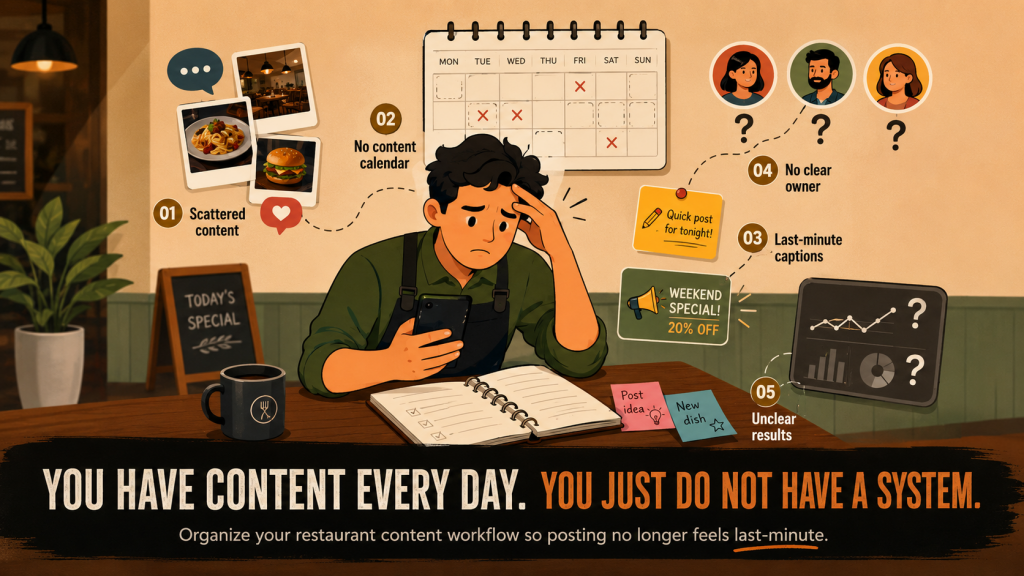
The problem is not a lack of creativity. The problem is that your content process is not organized.
Without a clear workflow, every post becomes a last-minute project. You have to find a photo, think of a caption, check the details, and decide when to publish it, all while running your restaurant.
A social media content management tool helps you organize this process. You can store content ideas, prepare posts in advance, schedule publication, and review performance from one place.
This allows you to stay consistent without making social media another daily emergency.
2. Stop Treating Every Post as a Separate Project
If your team starts from zero every time you need to post, social media will always feel like extra work.
You have to:
- Find a content idea.
- Take a photo or video.
- Write the caption.
- Ask for approval.
- Log in to the platform.
- Decide when to publish.
- Repeat the same process a few days later.
This is slow, repetitive, and difficult to maintain.
Instead of creating one post at a time, build a system that produces several pieces of content at once.
This approach is called content batching.
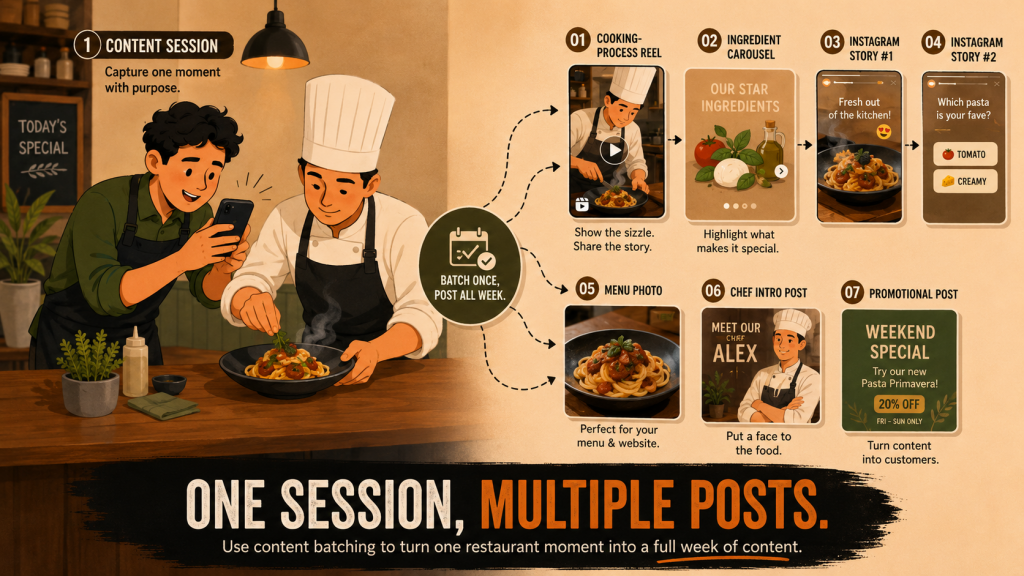
With content batching, you set aside one short session to collect multiple photos, videos, and ideas. You can then organize and schedule them using social media content management tool.
For example, one 30–45 minute content session in your restaurant can produce:
- One Reel showing the cooking process.
- One carousel explaining the ingredients.
- Two Instagram Stories.
- One menu photo.
- One post introducing your chef.
- One promotional post.
That means one short content session can cover several days of social media.
The goal is not to create more work. The goal is to reuse the same restaurant moment in different formats.
For example, if your chef prepares a new pasta dish, you can turn that single activity into:
- A short cooking video.
- A close-up food photo.
- A behind-the-scenes Story.
- A carousel about the ingredients.
- A caption about the inspiration behind the dish.
- A promotional post for the launch.
A social media content management tool helps you keep all of these assets organized. You can prepare captions, choose publishing dates, and schedule everything in advance instead of starting over each time.
When you stop treating every post as a separate project, social media becomes easier to manage and much more consistent.
3. Turn Daily Restaurant Operations into Content
You do not always need to create special moments for social media.
Your restaurant operations already give you content every day.
The key is to notice what is happening, capture it quickly, and turn it into the right format.
Here are practical examples:
| Restaurant activity | Content idea |
| Preparing before opening | Behind-the-scenes Reel |
| Most frequently ordered menu item | Best-seller post |
| Launching a new menu item | Teaser and launch post |
| Fresh ingredients arriving | Fresh ingredient Story |
| Customer leaves a positive review | Testimonial post |
| Chef plating a dish | Short process video |
| Restaurant during peak hours | “A night at our restaurant” Reel |
| New staff member joins | Meet the team post |
| Popular menu item is almost sold out | Urgency Story |
| Promotion is currently running | Offer post |
| Customers often ask the same question | FAQ carousel |
This approach makes content creation easier because you are not starting from a blank page.
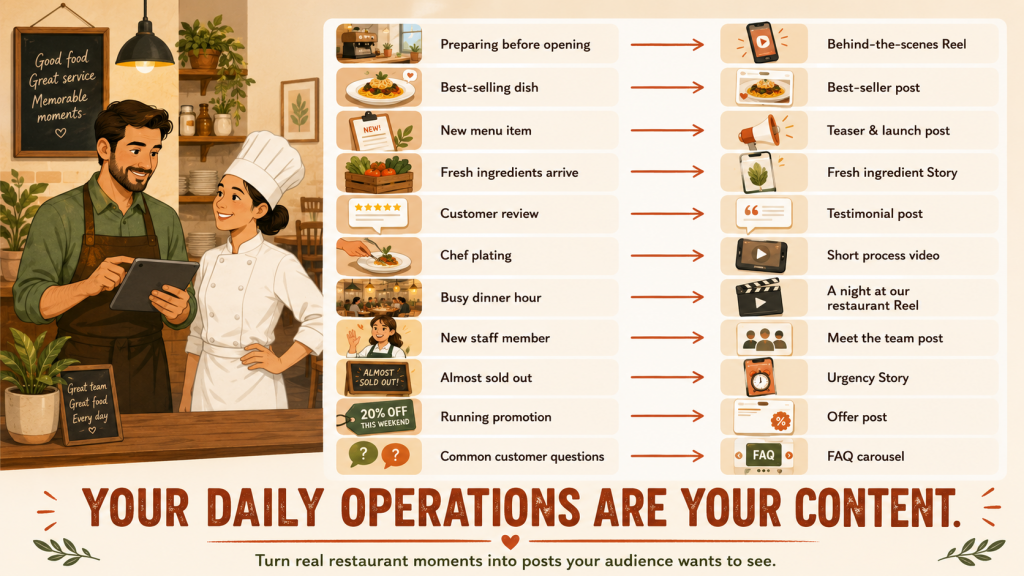
You are simply turning real restaurant moments into useful content.
For example, if fresh seafood arrives in the morning, you can create:
- A Story showing the delivery.
- A short video of the chef checking the ingredients.
- A post explaining where the seafood comes from.
- A menu promotion for that evening.
- A behind-the-scenes Reel showing preparation.
One restaurant activity can produce several posts when you use content batching and organize everything with social media content management tool.
You can apply the same approach to your people and customer experience.
A new team member can become a meet-the-team post. A busy dinner service can become a Reel. A customer review can become a testimonial. A commonly asked question can become an FAQ carousel.
Behind-the-scenes content, staff stories, cooking processes, and customer experiences work well because they show the real side of your restaurant.
They help customers see more than the final dish.
They see the people, effort, atmosphere, and story behind it.
With social media content management tool, you can save these ideas, group them by theme, prepare the captions, and schedule them in advance.
Your restaurant does not need to invent more content.
You need a simple system that helps you recognize and reuse the content already happening around you.
4. Use Restaurant Data to Decide What to Promote
You do not need to guess what your restaurant should promote.
Your sales and operational data can show you what customers already like, what needs more attention, and when a promotion may work best.
Start by reviewing data such as:
- Your best-selling menu items.
- Menu items with low sales.
- Your busiest transaction hours.
- Your quietest periods.
- Your most-used promotions.
- Items that are almost sold out.
- Seasonal products.
- Average transaction value.
- Changes in sales from one period to another.
You can then turn these insights into content ideas.
| Restaurant data | Content idea |
| Best-selling menu item | “Our Most Ordered Dish This Month” |
| Low-performing menu item | Explain the ingredients, flavor, or best way to enjoy it |
| Quiet business hours | Promote a limited-time offer for that period |
| New menu item | Create teaser, launch, and customer review posts |
| Two items often ordered together | Recommend them as a menu pairing |
| Promotion performs well | Extend it or create a similar campaign |
| Seasonal item sells quickly | Create urgency content before it sells out |
| Average order value is low | Promote bundles, add-ons, or sharing packages |
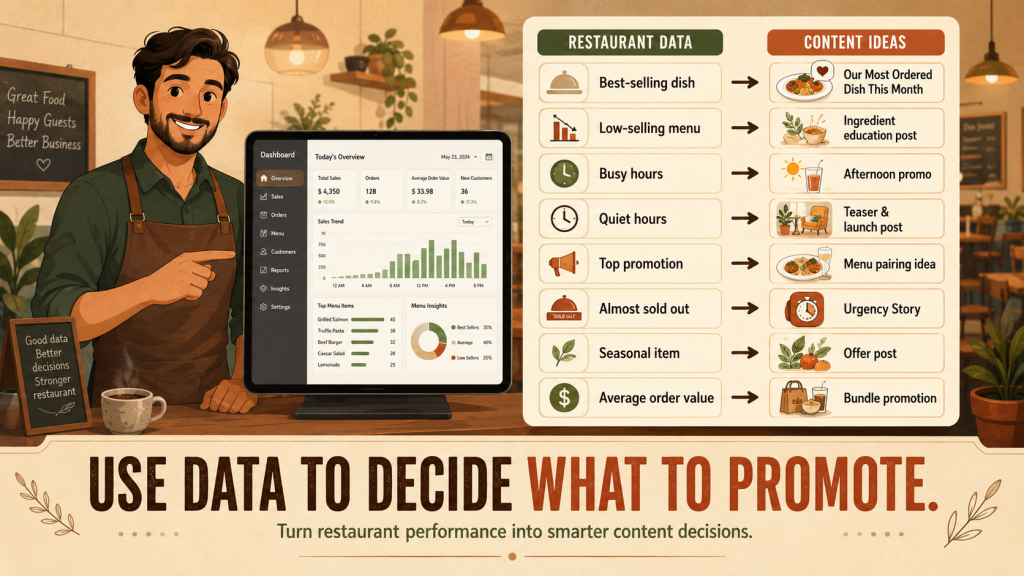
For example, if your best-selling item is grilled chicken, you can create a best-seller post, a behind-the-scenes cooking Reel, and a customer recommendation Story.
If one menu item is not selling well, do not immediately discount it. You can first create educational content explaining its ingredients, flavor, portion size, or the best drink to pair with it.
If your restaurant is quiet between 3 PM and 5 PM, you can create content promoting an afternoon offer specifically for that time.
Your content planning becomes more useful when it is connected to real restaurant performance. A POS Restaurant System can help you identify best-selling dishes, busy periods, ordering patterns, promotion results, and changes in customer spending. You can then turn these insights into timely social media content instead of relying only on guesswork.
Once you know what to promote, use social media content management tool like Sociosight to organize the campaign.
You can prepare several posts at once through content batching, schedule them across the week, and compare which messages generate the strongest response.
For example, a new menu launch can include:
- A teaser post before launch.
- A behind-the-scenes preparation Reel.
- A launch-day menu photo.
- A customer reaction Story.
- A review or testimonial post.
- A reminder post several days later.
The goal is not to post more randomly.
The goal is to use restaurant data to create content that supports real business decisions.
5. Build Five Simple Content Pillars
You do not need dozens of content categories.
Five simple content pillars are enough to keep your restaurant account varied, useful, and easier to manage.
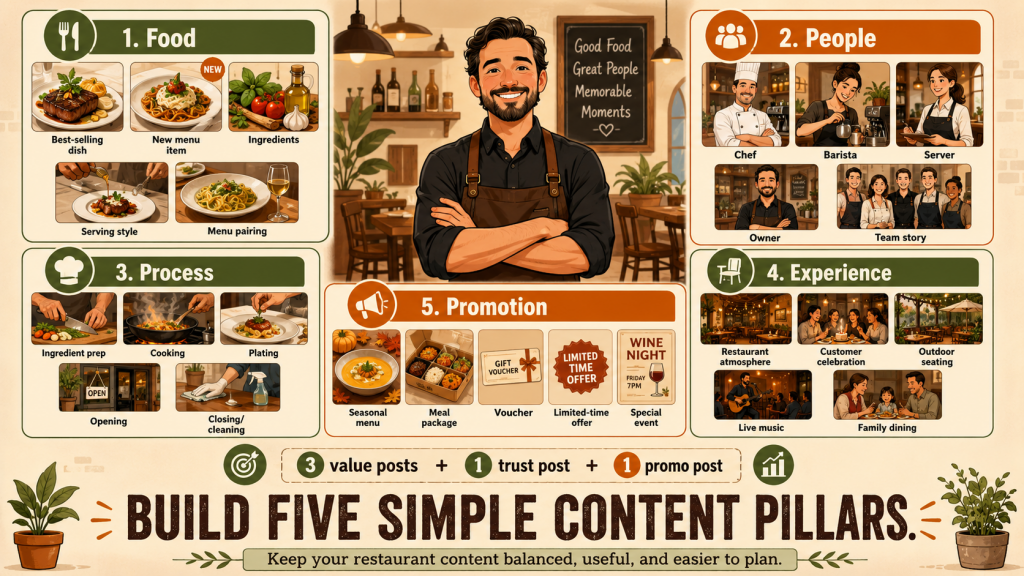
1. Food
Use this pillar to show what customers can order.
Content ideas include:
- Best-selling dishes.
- New menu items.
- Ingredient highlights.
- Serving suggestions.
- Food and drink pairings.
Food content helps customers understand what makes your menu worth trying.
2. People
Your restaurant is not only about food. It is also about the people behind it.
You can feature:
- Your chef.
- Your barista.
- Your servers.
- The restaurant owner.
- Team stories.
People-focused content makes your restaurant feel more personal and trustworthy.
3. Process
Show customers what happens before the dish reaches their table.
You can create content about:
- Ingredient preparation.
- Cooking.
- Plating.
- Opening the restaurant.
- Closing and cleaning.
Process content works well because it shows the effort, care, and standards behind your restaurant.
4. Experience
Customers do not only visit for food. They also come for the atmosphere and experience.
You can highlight:
- The restaurant atmosphere.
- Customer celebrations.
- Outdoor seating.
- Live music.
- Family dining.
This pillar helps potential customers imagine themselves visiting your restaurant.
5. Promotion
Use promotional content to give customers a clear reason to visit or order.
Examples include:
- Seasonal menus.
- Meal packages.
- Vouchers.
- Limited-time offers.
- Special events.
Promotions are important, but they should not dominate your account.
Use this simple formula:
For every five posts, create three posts that tell a story or provide value, one post that builds trust, and one promotional post.
For example:
- Post 1: A behind-the-scenes cooking video.
- Post 2: A best-selling dish.
- Post 3: A customer dining experience.
- Post 4: A chef or team story.
- Post 5: A limited-time promotion.
This balance keeps your account from looking like a discount catalogue.
You can organize these five pillars inside your social media content management tool and use content batching to prepare several posts for each pillar at once.
When every post belongs to a clear pillar, planning becomes faster and your restaurant content stays balanced.
6. Create a Weekly Restaurant Content Workflow
You do not need to work on social media every day.
You need a simple weekly workflow that tells your team what to do and when to do it.
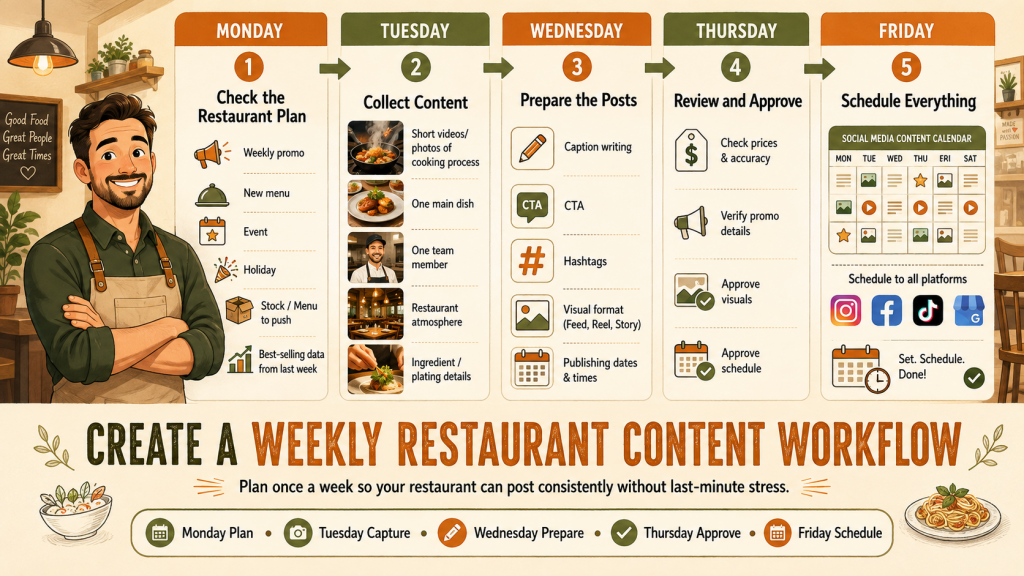
Monday: Check the Restaurant Plan
Start by reviewing what is happening in your restaurant that week.
Check:
- Current promotions.
- New menu items.
- Special events.
- Public holidays.
- Menu items or stock you want to promote.
- Best-selling items from the previous week.
Use this information to decide what your content should support.
For example, if a new brunch menu launches on Saturday, your content plan may include a teaser, a preparation Reel, a launch post, and a customer reaction Story.
Tuesday: Collect Content
Set aside a short time to take photos and videos.
Capture:
- The cooking process.
- One main menu item.
- One team member.
- The restaurant atmosphere.
- Ingredients or plating details.
You do not need a full professional photoshoot every week.
A focused 30-minute session is often enough for content batching and can give you several posts for the days ahead.
Wednesday: Prepare the Posts
Turn the collected materials into ready-to-publish content.
Prepare:
- Captions.
- Calls to action.
- Hashtags.
- Visual formats.
- Publishing dates.
Keep each post focused on one clear message.
A food post may encourage customers to try a dish. A team post may build trust. A promotional post should clearly explain the offer, timing, and conditions.
Thursday: Review and Approve
The owner or manager should not need to rebuild the content.
They only need to check:
- Prices.
- Promotion details.
- Visual accuracy.
- Publishing schedule.
This makes approval faster and reduces last-minute corrections.
It also helps prevent common mistakes such as incorrect prices, expired promotions, or missing terms and conditions.
Friday: Schedule Everything
Once the content is approved, schedule it for the following days.
Use social media content management tool to publish across multiple platforms without logging in and posting manually every day.
With Sociosight, you can organize your restaurant content in a calendar, prepare posts in advance, and schedule them across multiple social media profiles.
This gives you a clear weekly system:
Plan on Monday, collect on Tuesday, prepare on Wednesday, approve on Thursday, and schedule on Friday.
Your team always knows the next step, and social media no longer depends on someone remembering to post at the last minute.
7. Plan One Week of Content in 30 Minutes
You do not need hours to plan your restaurant content.
In 30 minutes, you can map out one week of posts using activities, menu items, and customer moments that already exist in your restaurant.
Here is a simple example:
| Day | Content | Format | Goal |
| Monday | Most ordered menu item | Carousel | Product discovery |
| Tuesday | Kitchen preparation | Reel | Build trust |
| Wednesday | Story about one team member | Photo post | Humanize the brand |
| Thursday | Customer review | Story | Build social proof |
| Friday | Weekend meal package | Promotional post | Drive orders |
| Saturday | Restaurant atmosphere | Reel | Show the experience |
| Sunday | Favorite menu poll | Story | Increase engagement |
You can prepare this plan by answering four simple questions:
- What menu item should you highlight?
- What restaurant moment can you capture?
- What customer proof can you share?
- What offer or event should you promote?
Then add each idea to your social media content management tool, prepare the captions through content batching, and schedule the posts in advance.
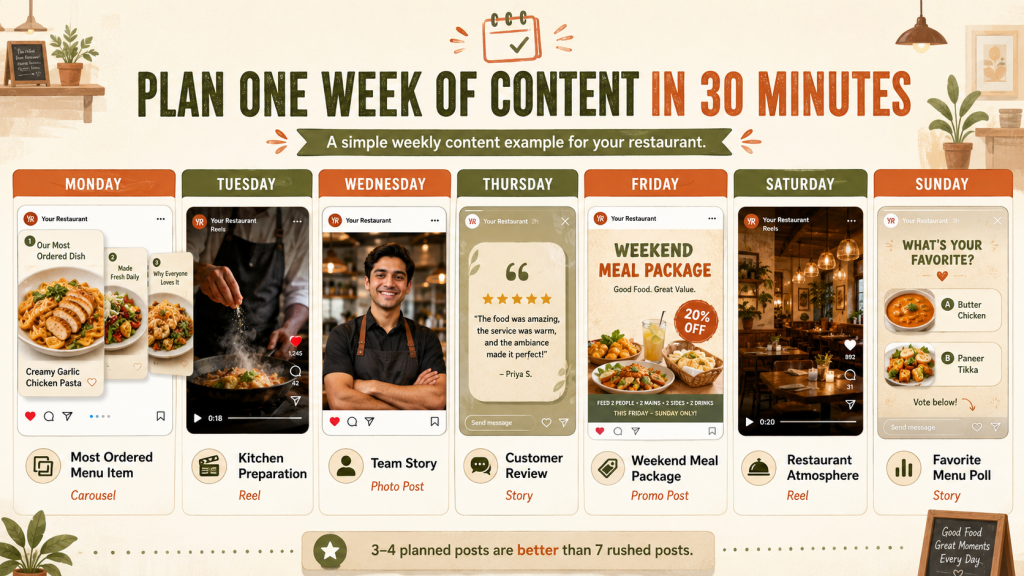
You do not have to publish every day.
Three or four well-planned posts are better than seven rushed posts with repetitive captions and unclear goals.
For example, you may choose to post only on Monday, Wednesday, Friday, and Saturday. Stories can then be used on other days for quick updates, polls, customer reviews, or behind-the-scenes moments.
The purpose of a weekly plan is not to fill every day.
It is to make sure every post has a clear reason to exist.
8. Use One Content Idea Across Multiple Platforms
You do not need a completely different idea for every social media platform.
One strong restaurant topic can be adapted into several formats.
For example, imagine you are launching a new grilled chicken menu.
You can turn that single idea into:
- Instagram Reel: Show the grilling process.
- Instagram carousel: Explain the ingredients, flavor, and serving style.
- Facebook post: Share the story behind the new menu.
- Instagram Story: Ask customers to vote for their favorite sauce.
- Pinterest post: Publish a high-quality photo of the final dish.
- LinkedIn post: Share how your restaurant team developed and tested the menu.
The main topic stays the same, but the format and message change for each platform.
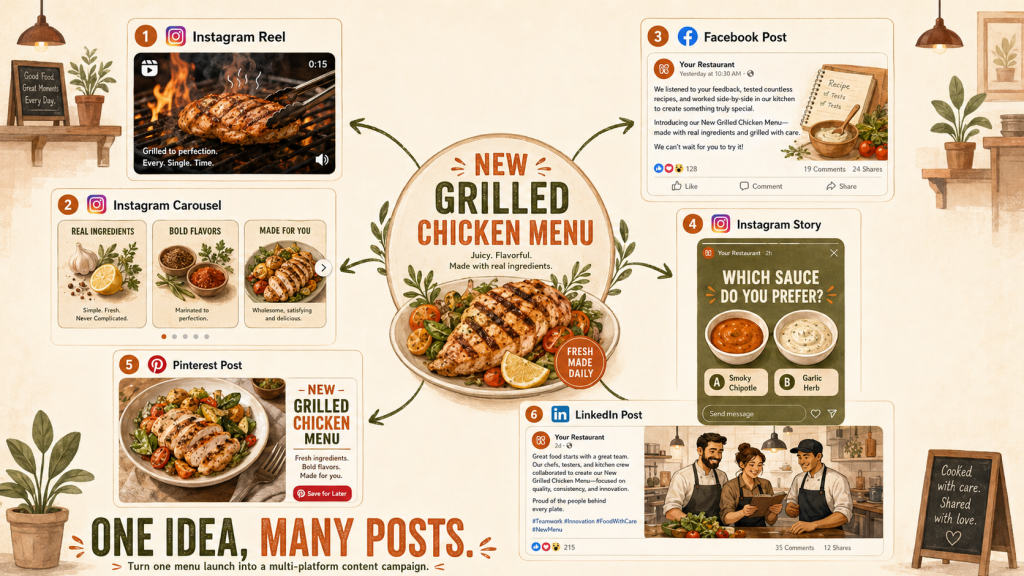
On Instagram, you can focus on visuals and short-form videos. On Facebook, you can tell a longer story. On Pinterest, you can highlight presentation. On LinkedIn, you can discuss teamwork, innovation, or business decisions behind the menu.
This helps you get more value from every content idea.
Instead of creating six unrelated posts, you create one content theme and adapt it for six different uses.
You can manage this process through content batching. Capture the photos and videos in one session, then prepare the different captions and formats together.
A social media content management tool helps you organize each version, assign it to the correct platform, and schedule it at the right time.
One idea should not produce only one post.
It should become a small content campaign that reaches customers across several platforms.
9. What Social Media Content Management Tool Should Help You Do
The right social media content management tool should make your work simpler, not add another complicated system to manage.
As a restaurant owner, look for tool that helps you:
- Manage several social media accounts in one place.
- Build a clear content calendar.
- Save content ideas before they are forgotten.
- Write and store drafts.
- Schedule posts in advance.
- Review and approve content.
- Reuse strong content across different platforms.
- Track content performance.
- Compare results between platforms.
- Reduce repetitive manual work.
The main goal is not to have more features.
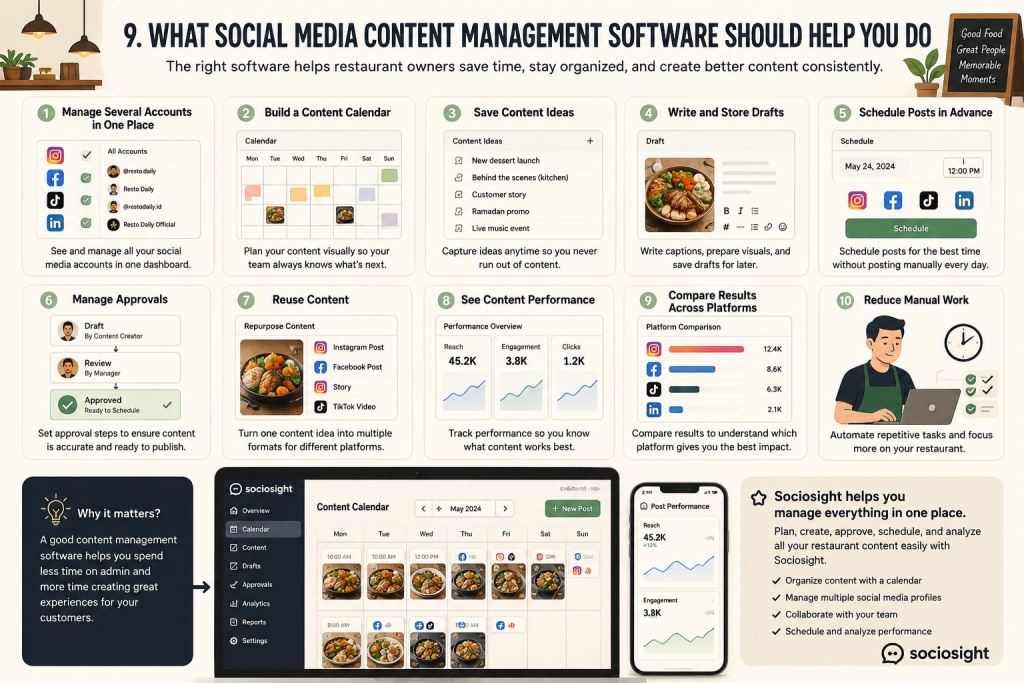
The main goal is to spend less time switching between apps, searching for files, rewriting captions, and posting manually.
For example, you should be able to take one restaurant campaign, prepare several versions, schedule them for different platforms, and review the results from one workflow.
A practical social media content management tool should also support content batching. This allows you to prepare several posts at once instead of starting from zero every time.
Once your content is ready, your team should be able to see:
- What has been drafted.
- What needs approval.
- What has been scheduled.
- What has already been published.
- Which posts are performing best.
Sociosight is designed to support this kind of workflow. You can organize content in a calendar, manage multiple social profiles, prepare posts in advance, and schedule them without logging in to each platform separately.
The tool should not replace your restaurant’s personality or creativity.
It should give you a clearer system so your team can create better content with less manual effort.
10. Measure Results Beyond Likes
Likes can show that people noticed your content, but they do not always show whether the post helped your restaurant.
You should also track actions that are closer to real business results.
Useful metrics include:
- Profile visits.
- Website or digital menu clicks.
- Direction requests.
- Reservation inquiries.
- WhatsApp messages.
- Saves.
- Shares.
- Voucher usage.
- Orders after a campaign.
- Sales growth for promoted menu items.
For example, a post may receive fewer likes but generate more menu clicks, reservations, or WhatsApp inquiries. That post may be more valuable than a highly liked post that does not lead to any customer action.
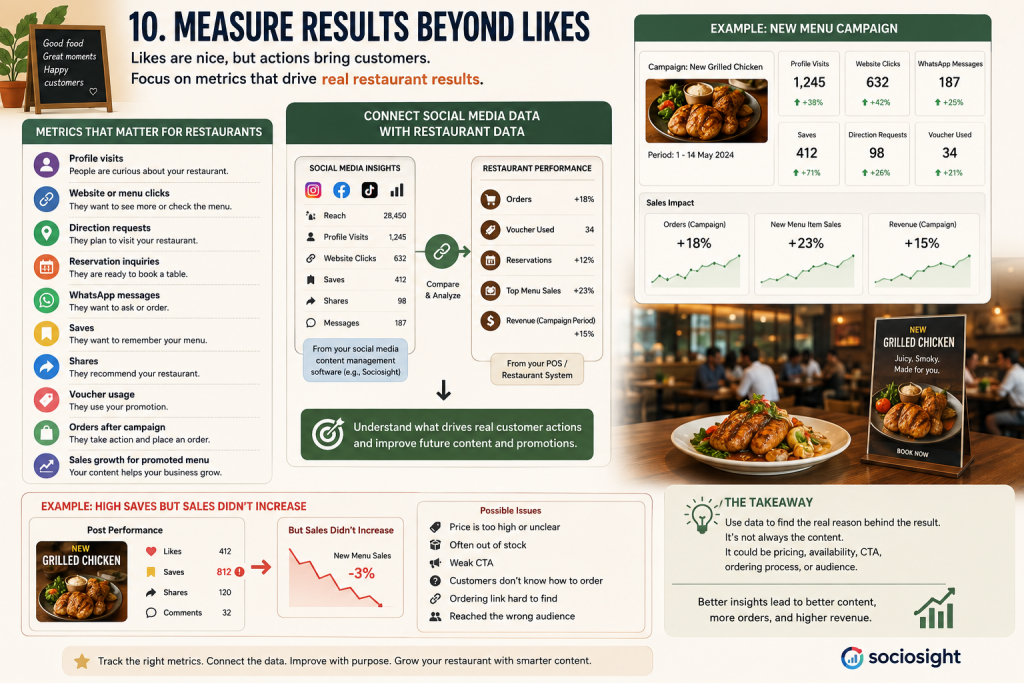
You should also compare social media performance with your restaurant data.
Ask:
- Did sales increase after the campaign?
- Did more customers order the promoted dish?
- Was the voucher actually used?
- Did reservations increase?
- Did customers visit during the promoted time period?
- Did average order value improve?
A social media content management tool can help you identify which posts generate reach, engagement, clicks, saves, and shares.
Your POS Restaurant System can then help you check whether those campaigns are connected to actual orders, menu performance, voucher usage, or changes in sales.
For example, imagine a new menu post receives many saves, but sales do not increase.
This may mean the content is interesting, but another problem is stopping customers from ordering.
The issue could be:
- The price is unclear or too high.
- The menu item is often unavailable.
- The call to action is weak.
- Customers do not know how to order.
- The ordering link is difficult to find.
- The post reached people outside your service area.
Do not immediately assume the content failed.
Use the data to understand where the customer journey breaks.
The goal is not to collect more likes.
The goal is to learn which content brings people closer to visiting, ordering, reserving, or buying from your restaurant.
11. Common Mistakes Restaurant Owners Should Avoid
Even with a clear plan, a few common mistakes can make your restaurant content less effective.
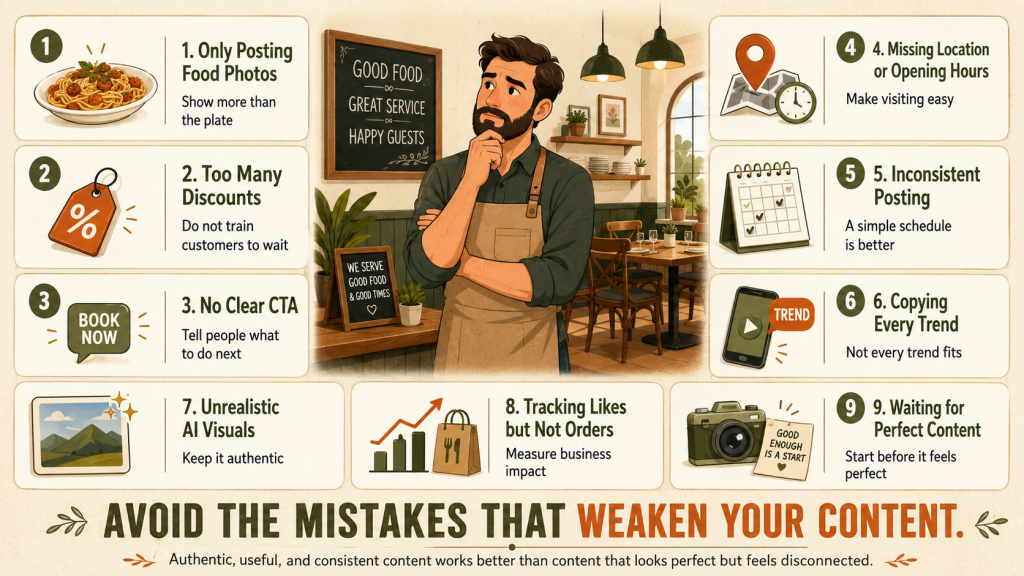
1. Posting Only Food Photos
Food photos are important, but your account should not look like a digital menu.
You also need content about your team, kitchen process, customer experience, restaurant atmosphere, and the story behind your dishes.
People want to see more than the final plate.
2. Offering Discounts Too Often
If most of your posts promote discounts, customers may start waiting for the next offer instead of paying the regular price.
Use promotions carefully.
Balance them with useful, entertaining, and trust-building content.
A simple rule is to make only one out of every five posts promotional.
3. Publishing Content Without a Clear CTA
Every post should guide customers toward a simple next step.
Your CTA may ask them to:
- Visit your restaurant.
- Reserve a table.
- View the menu.
- Send a WhatsApp message.
- Save the post.
- Share it with a friend.
- Vote in a poll.
- Try a specific dish.
Without a CTA, customers may enjoy the post but take no further action.
4. Forgetting Your Location or Opening Hours
Do not assume every viewer already knows where you are or when you are open.
For posts that are designed to drive visits, include useful information such as:
- Restaurant location.
- Opening hours.
- Reservation method.
- Ordering link.
- Promotion period.
- Terms and conditions.
Make it easy for interested customers to act immediately.
5. Posting Inconsistently
You do not need to publish every day, but you should avoid disappearing for long periods.
A realistic schedule is better than an ambitious one you cannot maintain.
Three planned posts every week are more effective than seven rushed posts followed by two weeks of silence.
Use social media content management tool to create a manageable calendar and schedule content in advance.
6. Copying Every Trend
Not every social media trend fits your restaurant.
Before using a trend, ask:
- Is it relevant to your audience?
- Can it show your food, team, or restaurant experience?
- Does it match your brand personality?
- Will customers understand the message?
Use trends as a format, not as your entire content strategy.
7. Using Unrealistic AI Visuals
AI can help you develop ideas, prepare layouts, and improve content production.
However, unrealistic food images can create the wrong expectations.
If the dish shown online looks very different from what customers receive, trust can quickly disappear.
Simple photos and videos from your real kitchen often feel more authentic than highly polished visuals that look generic or artificial.
Use AI to support your content, not to misrepresent your restaurant.
8. Measuring Likes but Ignoring Orders
A post with many likes is not automatically successful.
You should also check whether it generated:
- Menu clicks.
- Messages.
- Reservations.
- Voucher use.
- Direction requests.
- Orders.
- Sales of the promoted menu item.
Connect the performance shown in your social media content management tool with actual restaurant data.
This helps you understand whether your content is creating attention or producing business results.
9. Waiting Until Everything Is Perfect
You do not need professional equipment, perfect lighting, or a large content team before you begin.
Start with what you have.
A short kitchen video, a team photo, or a genuine customer moment can perform better than content that feels too polished.
Consistency, relevance, and authenticity matter more than perfection.
12. A Simple Restaurant Content Checklist
Before you publish or schedule a post, use this checklist to catch missing information and avoid unnecessary mistakes.
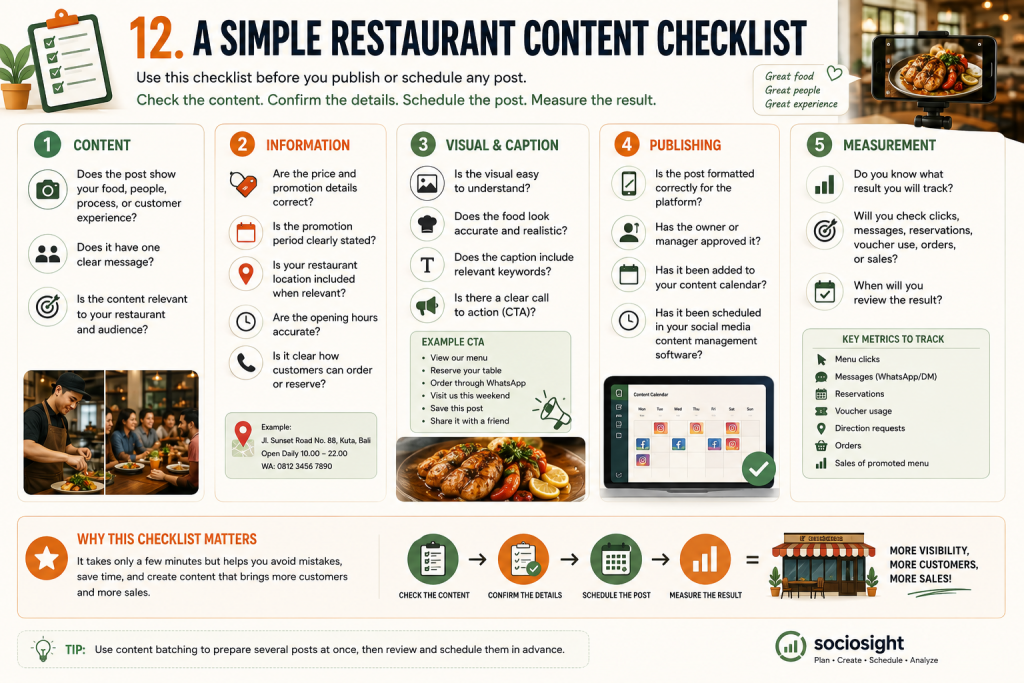
Content
- Does the post show your food, people, process, or customer experience?
- Does it have one clear message?
- Is the content relevant to your restaurant and audience?
Information
- Are the price and promotion details correct?
- Is the promotion period clearly stated?
- Is your restaurant location included when relevant?
- Are the opening hours accurate?
- Is it clear how customers can order or reserve?
Visual and Caption
- Is the visual easy to understand?
- Does the food look accurate and realistic?
- Does the caption include relevant keywords?
- Is there a clear call to action?
Your CTA could be:
- View the menu.
- Reserve your table.
- Order through WhatsApp.
- Visit us this weekend.
- Save this post.
- Share it with a friend.
Publishing
- Is the post formatted correctly for the platform?
- Has the owner or manager approved it?
- Has it been added to your content calendar?
- Has it been scheduled in your social media content management tool?
Measurement
- Do you know what result you will track?
- Will you check clicks, messages, reservations, voucher use, orders, or sales?
- When will you review the result?
A checklist only takes a few minutes, but it can prevent incorrect prices, missing promotion details, weak CTAs, and posts that are published without a clear purpose.
You can also add this checklist to your content batching workflow. Review several posts together before scheduling them, rather than checking each one at the last minute.
Before publishing, remember this simple rule:
Check the content, confirm the details, schedule the post, and measure the result.
Conclusion: Build a System, Not More Pressure
You do not need to spend every day thinking about what to post.
You need a repeatable system that turns real restaurant activities into useful content.
Your food, team, kitchen process, customer experience, promotions, and restaurant data already give you enough material. The challenge is organizing those moments before they are forgotten.
With the right social media content management tool, you can collect ideas, prepare content through content batching, schedule posts, and review performance without adding more pressure to your daily operations.
Start simple.
Choose five content pillars. Collect one week of restaurant moments. Prepare several posts at once. Then schedule your first batch of content with Sociosight. Schedule a demo now or chat with us to learn more about Sociosight.
The goal is not to post more.
The goal is to create a content system you can maintain.